Meryam Sahin (talk | contribs) Created page with "{{DISPLAYTITLE:NotifyMe}}Registered wiki users receive notifications for a variety of changes to the wiki. Users can subscribe to different types of notifications. == Automatically generated notifications == <span class="youtubelink">alt=default subscriptions set in the user preferences|thumb|[[File:youtube-icon.png|alt=YouTube icon|left|22x22px[https://youtu.be/UojRGLmDTwM YouTube: Notifications subscriptions (4:55 min.)] |360x..." |
Meryam Sahin (talk | contribs) No edit summary |
||
| Line 1: | Line 1: | ||
{{DISPLAYTITLE:Notifications}} | |||
Notifications inform users about changes and events in the wiki. Configure notification preferences to choose which events generate notifications, and use the watchlist to specify the pages and other contexts to monitor. | |||
== Configure notification preferences == | |||
Notification preferences can be configured under **User menu > Preferences > Notifications**. | |||
{{Textbox|boxtype=note|header=Notification preferences and the watchlist|text=Notification preferences determine which types of events generate notifications. The watchlist determines which pages and other contexts are monitored.|icon=yes}} | |||
[[File:notifications-preferences.png|alt=Notifications preferences showing notification subscriptions, delivery channels, and email frequency|center|thumb|750x750px|Notification preferences]] | |||
=== Notification subscriptions === | |||
The **Notification subscriptions** section contains notification types that can be enabled or disabled individually. | |||
{| class="wikitable" | |||
! Notification | |||
! Description | |||
|- | |||
| '''Page created''' | |||
| A page on the watchlist was created. | |||
|- | |||
| '''Page moved''' | |||
| A page on the watchlist was moved. | |||
|- | |||
| '''Page deleted''' | |||
| A page on the watchlist was deleted. | |||
|- | |||
| '''Page edited''' | |||
| A page on the watchlist was edited. | |||
|- | |||
| '''A new comment has been added to a page to which the user has subscribed via preferences''' | |||
| A new comment was added to a page on the watchlist. | |||
|- | |||
| '''Another user replied to a comment that the user has created or is watching''' | |||
| Another user replied to a comment created by the user or to a comment the user is watching. | |||
|- | |||
| '''A page was approved''' | |||
| A page on the watchlist was approved. | |||
|} | |||
=== Notification channels === | |||
Notifications are always sent in the wiki. Additional delivery channels can be enabled in the **Notification channels** section. | |||
'''Email''' sends notifications by email in addition to notifications in the wiki. | |||
=== Configure the email notification frequency === | |||
The **Frequency of email notifications** setting determines how often email notifications are sent. | |||
Available options are: | |||
* '''Instant''' | |||
* '''Daily''' | |||
* '''Weekly''' | |||
== Add a page or context to the watchlist == | |||
The watchlist determines which pages and other contexts are monitored for notification events. | |||
Supported watchlist contexts include: | |||
* pages | |||
* namespaces | |||
* categories | |||
* books | |||
* other contexts where the **Watch** icon is available | |||
[[File:watchlist-watch-icon.png|alt=Watch icon for adding the current page or context to the watchlist|center|thumb|550x550px|Watch icon]] | |||
'''To add a page or context to the watchlist:''' | |||
# Open the page or context to monitor. | |||
# Select the **Watch** icon. | |||
The page or context is added to the watchlist. Notifications configured under **Preferences > Notifications** can then be generated for relevant events in that context. | |||
== View notifications == | |||
If unread notifications are available, the notification icon in the top toolbar shows the number of unread notifications. Select the notification icon to open the notification menu with recent notifications. | |||
[[File:notifications-menu.png|alt=Notification menu showing recent notifications and the number of unread notifications|center|thumb|550x550px|Notification menu]] | |||
Select the link at the end of the notification menu to open the **Notification center**. | |||
[[File:notifications-center.png|alt=Notification center showing Unread, Read, and All notifications|center|thumb|750x750px|Notification center]] | |||
The **Notification center** provides the following options: | |||
* '''Unread''' displays unread notifications. | |||
* '''Read''' displays notifications that have already been read. | |||
* '''All''' displays all available notifications. | |||
* Selecting a notification marks it as read. | |||
* The notification center provides access to notification preferences. | |||
== Automatically generated notifications == | |||
Some notifications are generated automatically and do not depend on notification preferences. | |||
<!-- Confirm current automatic notifications before finalizing this section. --> | |||
== Customize notification emails == | |||
Administrators can customize the content and design of notification emails directly in the wiki. | |||
By default, notification emails use the settings from ''Special:FlexiSkin''. If no active FlexiSkin settings exist, the standard template uses the BlueSpice logo and default colors. | |||
[[File:Standard notification email layout.png|alt=Default notification email layout with example content|center|thumb|550x550px|Notification email layout]] | |||
The default email layout can be customized by editing the following pages: | |||
* ''MediaWiki:Wrapper.mail'' | |||
* ''MediaWiki:SingleNotification.mail'' | |||
* ''MediaWiki:DigestNotification.mail'' | |||
{{Icon|bi bi-arrow-right-circle|||}} [[Manual:Extension/NotifyMe/Email layout|How to customize the notification email layout]] | |||
{{DISPLAYTITLE:NotifyMe}}Registered wiki users receive notifications for a variety of changes to the wiki. Users can subscribe to different types of notifications. | {{DISPLAYTITLE:NotifyMe}}Registered wiki users receive notifications for a variety of changes to the wiki. Users can subscribe to different types of notifications. | ||
Revision as of 12:41, 3 September 2026
Notifications inform users about changes and events in the wiki. Configure notification preferences to choose which events generate notifications, and use the watchlist to specify the pages and other contexts to monitor.
Configure notification preferences
Notification preferences can be configured under **User menu > Preferences > Notifications**.
Notification subscriptions
The **Notification subscriptions** section contains notification types that can be enabled or disabled individually.
| Notification | Description |
|---|---|
| Page created | A page on the watchlist was created. |
| Page moved | A page on the watchlist was moved. |
| Page deleted | A page on the watchlist was deleted. |
| Page edited | A page on the watchlist was edited. |
| A new comment has been added to a page to which the user has subscribed via preferences | A new comment was added to a page on the watchlist. |
| Another user replied to a comment that the user has created or is watching | Another user replied to a comment created by the user or to a comment the user is watching. |
| A page was approved | A page on the watchlist was approved. |
Notification channels
Notifications are always sent in the wiki. Additional delivery channels can be enabled in the **Notification channels** section.
Email sends notifications by email in addition to notifications in the wiki.
Configure the email notification frequency
The **Frequency of email notifications** setting determines how often email notifications are sent.
Available options are:
- Instant
- Daily
- Weekly
Add a page or context to the watchlist
The watchlist determines which pages and other contexts are monitored for notification events.
Supported watchlist contexts include:
- pages
- namespaces
- categories
- books
- other contexts where the **Watch** icon is available
To add a page or context to the watchlist:
- Open the page or context to monitor.
- Select the **Watch** icon.
The page or context is added to the watchlist. Notifications configured under **Preferences > Notifications** can then be generated for relevant events in that context.
View notifications
If unread notifications are available, the notification icon in the top toolbar shows the number of unread notifications. Select the notification icon to open the notification menu with recent notifications.
Select the link at the end of the notification menu to open the **Notification center**.
The **Notification center** provides the following options:
- Unread displays unread notifications.
- Read displays notifications that have already been read.
- All displays all available notifications.
- Selecting a notification marks it as read.
- The notification center provides access to notification preferences.
Automatically generated notifications
Some notifications are generated automatically and do not depend on notification preferences.
Customize notification emails
Administrators can customize the content and design of notification emails directly in the wiki.
By default, notification emails use the settings from Special:FlexiSkin. If no active FlexiSkin settings exist, the standard template uses the BlueSpice logo and default colors.

The default email layout can be customized by editing the following pages:
- MediaWiki:Wrapper.mail
- MediaWiki:SingleNotification.mail
- MediaWiki:DigestNotification.mail
How to customize the notification email layout
Registered wiki users receive notifications for a variety of changes to the wiki. Users can subscribe to different types of notifications.
Automatically generated notifications
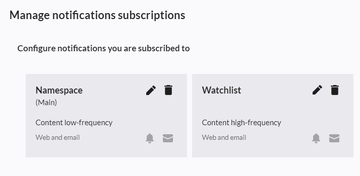

Some notifications are not dependent on a subscription and are always automatically sent to users. These include:
- Reminders: Your reminders are due in one week or today
- Read confirmation requests: You have a new read confirmation request
- Mentions and tasks: Another user mentioned you or a new task was assigned to you
- Workflow notifications: A workflow you initiated has finished or you have a new workflow task
- Page assignment changes: Someone assigned you to a page or removed your page assignment.
Note: Users are not automatically notified about changes on pages to which they are assigned. Assigned users have to subscribe to be notified. - Changes to your user page by other users
- Reverted changes via the page history by other users
- Changes to your wiki permissions and other administrative events
Events without notifications
The following events do not trigger notifications:
- own edits
- page revisions that are marked as "minor edit"
Subscribing to notifications
In addition to automatic notifications, you can subscribe to additional notifications. These custom notification sets are meant to inform you about very specific events in a single context (for example: page approvals in a particular namespace).

To subscribe to a notification set:
- Click on Preferences in your user menu.
- Switch to the tab Notifications.
- Click the Add button.
- Create your notification subscription. See below for selecting the options.
- Click Done to save your new notification set.
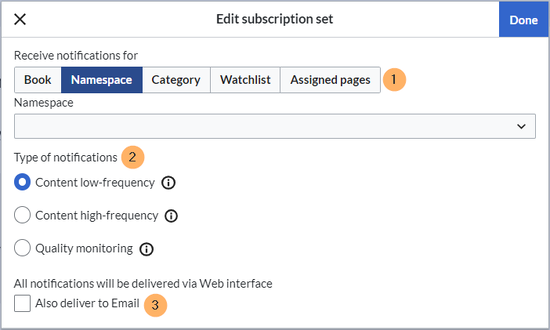
Subscription settings

Options
| Setting | Description |
|---|---|
| Receive notifications for |
|
| Type of notifications |
|
| Delivery method | By default, notifications appear in the wiki itself. If you want to get email notifications as well, you need to activate the email checkbox. |
List of events that trigger notifications
Viewing notifications
If a user has unread notifications, the bell symbol in the top toolbar shows the number of new notifications. Clicking the notification symbols opens a mega menu with the 10 most recent notifications.

At the end of the notifications is a link to view all notifications. This link opens the Notification center.

The following features are available in the Notification center:
1 - Notifications filter: The filter lists notifications by category or namespace.
2 - Status tab: You can view unread notifications as well as read notifications or all notifications.
3 - Preferences: Here you can clear the unread notifications list or go to your user preferences to update your notification subscriptions.
4 - Notification: Clicking on the filled-in blue notification marker will mark a notification as read.
Customizing the notification emails
By default, the emails use the settings from the page Special:FlexiSkin. If your wiki does not have active FlexiSkin settings, the standard template uses the BlueSpice Logo and default colors.
You can customize the content and design of the default email layout directly in the wiki. This requires changes to the following three pages:
- MediaWiki:Wrapper.mail
- MediaWiki:SingleNotification.mail
- MediaWiki:DigestNotification.mail


![alt=default subscriptions set in the user preferences|thumb|[[File:youtube-icon.png|alt=YouTube icon|left|22x22px](/Helpdesk/wiki/File:Notif_subscr_default_excerpt.png)


