Meryam Sahin (talk | contribs) Created page with "<bookshelf src="Book:User manual" /> {{DISPLAYTITLE:Collecting signatures}} The Content droplet Signature allows to collect user signatures on the pages ==Inserting a single signature== '''To insert the tag:''' #'''Click''' ''+'' in the visual editor toolbar. #'''Click''' ''Your signature''File:VE-insert-magicword.png|alt=Screenshot of the Insert menu with "Your signature" highlighted|center|thumb|300x300px|Insert your signature..." |
(No difference)
|
Latest revision as of 12:56, 5 August 2026
The Content droplet Signature allows to collect user signatures on the pages
Inserting a single signature
To insert the tag:
- Click + in the visual editor toolbar.
- Click Your signature
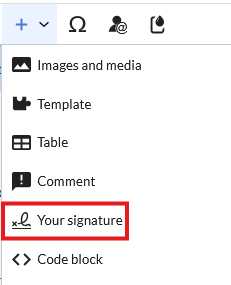
Insert your signature - The signature of the user editing the page is added and displayed on the page
- Save the page.

Inserting signatures in view mode
To insert the tag:
- Click on the Content Droplet menu in the visual editor toolbar.
- Search and select Signature
- Click on Insert
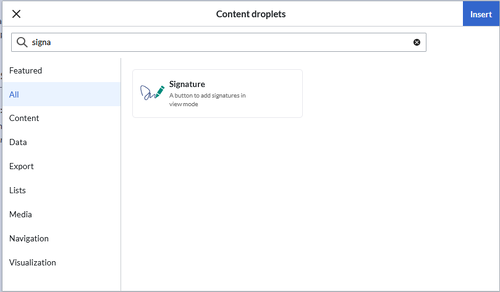
Signature Content Droplet - Click on Insert
- Save the page.

Once the page is saved, a Signatures area is shown on the page. A user with edit rights on the page can now add their signature with timestamp directly in view mode. This adds the signature to the page content.
Signatures are displayed in the chronological order in which users signed.
All signatures are visible to all users visiting the site.
Restrictions
The issue of signature forgery is important to this issue.
Each user's signature is added to the page in clear text, just as it would be done using the built-in MediaWiki signature feature.
Although not obvious to users reading the page, any user with editing rights can change, add, or remove these signatures.
The page history offers a certain protection. It will be listed there when users have added a signature via SignHere.


