Meryam Sahin (talk | contribs) Created page with "<bookshelf src="Book:User manual" /> ==About moving pages== A wiki page can only be renamed by moving it. Moving is necessary, since the web address of the page changes during renaming. Normally, there are many links to a wiki page. It is therefore important that these links still work after renaming the page. A page can be moved with or without redirecting the original page. Let's take a closer look at the differences. ==What happens when you move a page?== When you m..." |
Meryam Sahin (talk | contribs) No edit summary |
||
| Line 1: | Line 1: | ||
< | A page can be renamed by moving it to a new title. Moving a page changes its URL and transfers its content and version history to the new title. Existing links to the old page title are not updated automatically, so consider whether a redirect is needed before moving a page. | ||
==Understand page moves== | |||
When a page is moved: | |||
* The page title and URL change. | |||
* The page content is displayed under the new title. | |||
* The page's version history is transferred to the new page. | |||
* The original page can either become a redirect to the new page or no longer be available under the original title. <br> | |||
If no redirect is created, links to the original page title no longer lead to the moved page. Existing links must then be updated manually. | |||
{{Textbox|boxtype=warning|header=Links to the original page can break without a redirect|text=Moving a page does not automatically update links to the original page title. Before moving a page, check which pages link to it and decide whether to leave a redirect behind.|icon=yes}} | |||
==Before moving a page== | |||
Before moving a page, check which pages link to the current title. <br> | |||
'''To view the links to the page''': | |||
#Open '''More page actions'''. | |||
#Select '''...all actions'''. | |||
#Select '''What links here'''. | |||
[[File:action-move-what links here.png|alt=What links here page|center|thumb|550x550px|What links here]] | |||
If many pages link to the current title, leaving a redirect is generally recommended. Also consider links from external websites. <br> | |||
The following example shows how moving a page from "Emobile" to "Electric Vehicles" affects the original and new page titles: | |||
<drawio filename="Rename_and_move_pages" editmode="inline" alignment="center" /> | |||
==About moving pages== | ==About moving pages== | ||
A wiki page can only be renamed by moving it. Moving is necessary, since the web address of the page changes during renaming. Normally, there are many links to a wiki page. It is therefore important that these links still work after renaming the page. | A wiki page can only be renamed by moving it. Moving is necessary, since the web address of the page changes during renaming. Normally, there are many links to a wiki page. It is therefore important that these links still work after renaming the page. | ||
Revision as of 13:16, 19 August 2026
A page can be renamed by moving it to a new title. Moving a page changes its URL and transfers its content and version history to the new title. Existing links to the old page title are not updated automatically, so consider whether a redirect is needed before moving a page.
Understand page moves
When a page is moved:
- The page title and URL change.
- The page content is displayed under the new title.
- The page's version history is transferred to the new page.
- The original page can either become a redirect to the new page or no longer be available under the original title.
If no redirect is created, links to the original page title no longer lead to the moved page. Existing links must then be updated manually.
Before moving a page
Before moving a page, check which pages link to the current title.
To view the links to the page:
- Open More page actions.
- Select ...all actions.
- Select What links here.

If many pages link to the current title, leaving a redirect is generally recommended. Also consider links from external websites.
The following example shows how moving a page from "Emobile" to "Electric Vehicles" affects the original and new page titles:

About moving pages
A wiki page can only be renamed by moving it. Moving is necessary, since the web address of the page changes during renaming. Normally, there are many links to a wiki page. It is therefore important that these links still work after renaming the page.
A page can be moved with or without redirecting the original page. Let's take a closer look at the differences.
What happens when you move a page?
When you move a page:
- you rename the page name and thus the page title
- the page content is displayed on the new page
- the version history of the original page is transferred to the new page
If you move from the original page to the new page, an additional page with the old page name will be created. This page then serves as a redirect to the new page. If you do not create a redirect, the original page is simply replaced. In this case, you should check and update the links to the old page on your wiki.
What links here
Before you move a page, you should see if other pages link to that page name. To do this, go to What links here under ...all actions in the page tools. If many links are listed here, you should create a redirect when moving the page.
The following diagram shows how to rename an "Emobile" page to a page called "Electric Vehicles" page:
How do I move a page?
Go to the page tools menu item "Manage page> Move":
- Click Move.
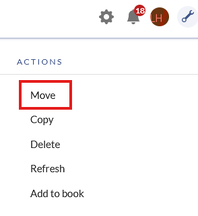
Actions menu - Enter a new page name. If you move the page to a different namespace, you need to include the namespace prefix as well.
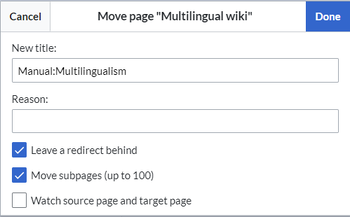
Moving a page to a different namespace and renaming the page - Provide a reason why why it was necessary to move the page (optional). This reason is shown in the logs of the wiki.
- Leave a redirect behind: Depending on the linking status or purpose of a page, you now have to decide whether to move the page with or without forwarding.
- Watch source page and target page: Specify whether you want to put the source and landing pages on your watch list when redirecting.
- Click Done. The page has been moved.
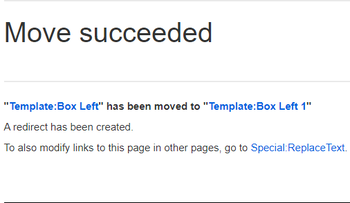
Successfull move


Move with redirect
It makes sense to create a redirect in the following cases:
- The original page is linked to many other sites (e.g., from other websites or other internal wiki sites).
- The title of the original page is sometimes used in the search and the page should be found either way.
- The page is returned as a result of an SMW query . In that case, due to a bug, the original page needs to be deleted manually after the page move. -v4.3.2
Move without redirect
In these cases, it makes sense to move without forwarding:
- A spelling error is corrected in the title. There are only a few links to the page and they are easy to find and replace.
- The original title should not appear in the search.
- An unnecessary redirection via a forwarding page should be avoided.
Updating references to the page
If no redirect was created when the page was renamed, it is sometimes necessary to check if existing links to the original page exist in your wiki. These must then be adapted accordingly to the new page name, so that the page is newly networked.
Users with administrator permissions can go to the page Special:Replace Text to find references to the previous page name.
Enter the original page title under "Existing text" and the new page title under "Replacement text":

Select all wiki sections using the "All" button to find existing references to the original page:

If you click on "Continue" the text will not be replaced yet. First, an overview page with the results found will be displayed. Check which of the results you want to replace and check the box. Click "Replace" to perform the replacement:

The last page now confirms that the wiki is now completing the text replacements:

Your wiki is now correctly linked again and the editing of the page renaming is completed. Depending on the number of replacements, it may take a while before the changes are actually visible. The changes made by this special page are collected in a queue, which is gradually processed in the background.

